
Introduction to SLIM: How to Share and Back Up Your [SAVED SEARCHES]

After logging in to the SLIM system, you can use [SAVED SEARCHES] to directly find the materials you need. This saves you the trouble of repeatedly entering keywords, setting search fields, or applying filters like publication years and material types. But what if you want to share these search queries with others or back them up? 【中文說明請見此文章:SLIM雲端圖書館自動化系統介紹(35)如何分享及備份「已儲存的檢索條件」】
Here is how you can do it:
1. Please log in to the SLIM system, then click [My Favorites].

2. Click [SAVED SEARCHES].
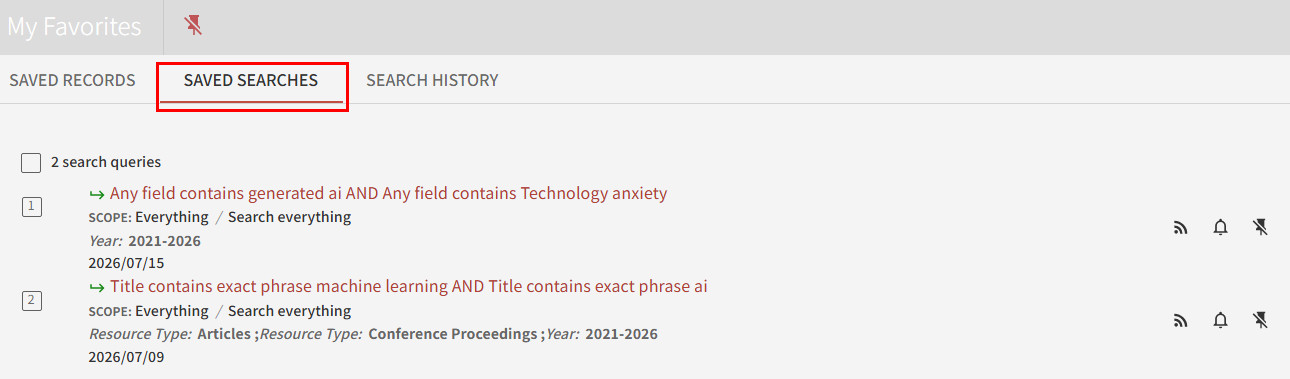
3. Right-click on the saved search item you want to share, copy link address, and you can share it directly with your colleagues or friends!


Tip: By saving these copied links directly to your browser’s “Bookmarks” or “Favorites,” you can instantly view the latest search results in the future—even without logging into SLIM! Additionally, exporting your browser’s bookmarks is an easy way to batch back-up all your saved searches.

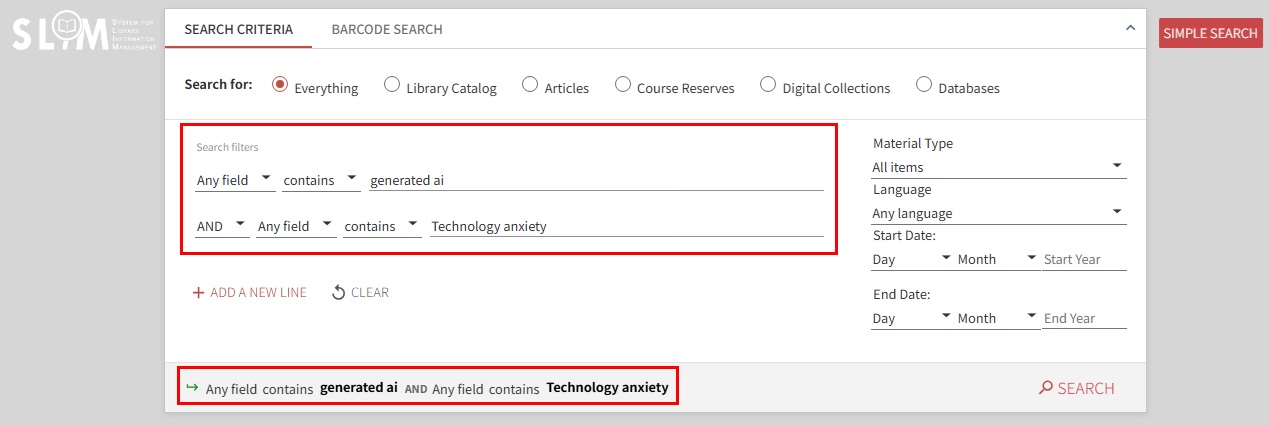
Finally, don’t forget to click the “arrow” to double-check that all your keywords and applied filters are loaded correctly to ensure the accuracy of your search results.
Further Readings:
by Wenling Lo